Product Management Product Design Engineering AI

CastSocial: Your Social Media Team, Powered by AI

My last startup failed because we overhired. At Sane, I keep things lean on purpose. That means social media only happens when I have a spare moment, and spare moments are rare. So instead of hiring a social media manager, I built one.

Role
Solo. Strategy, PRD, design, code, deployment
Stack
React 18, FastAPI, PostgreSQL 16, Claude API, Railway
Status
Timeline
One week. PRD to production.
Context
Built to keep Sane visible without hiring
Scope
176+ endpoints, 3-agent AI pipeline, multi-tenant
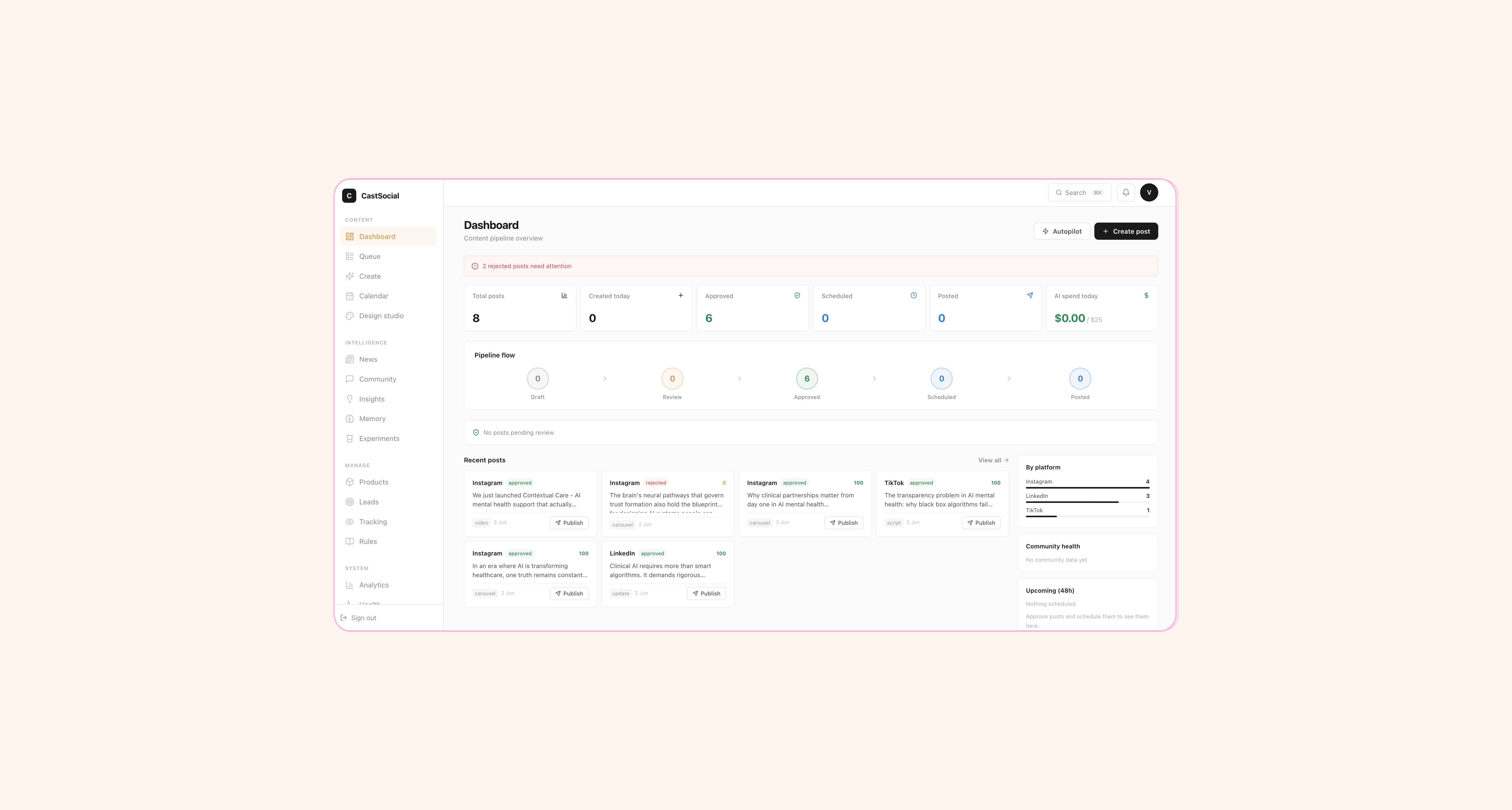
CastSocial dashboard with pipeline flow and content stats

The CastSocial dashboard. Pipeline flow, KPI cards, rejected post alerts, and recent content at a glance.

Problem Definition

The real cost of staying lean

There is a specific kind of failure that changes how you build everything after it. My previous startup scaled headcount before it scaled revenue. We hired for functions we did not need yet. When the money ran out, the team was too large to sustain. That experience rewired how I think.

At Sane, I run intentionally lean. No unnecessary hires. But lean has a cost. Things like social media fall to whoever has time, which is nobody. We were doing real work in clinical AI. Published research, actual products in care settings. Our social presence did not reflect any of it. Posts went out when I remembered, with no consistency, no strategy, no voice.

The problem was not just "we need to post more." It was the entire workflow. Coming up with ideas, writing posts that sound like us, adapting them per platform, reviewing quality, scheduling, publishing, tracking performance. That is a full role, not a task. And I was not going to fill it with a hire.

01
Inconsistency. We posted when someone had a free hour. That meant weeks of silence followed by a burst of three posts in one day. Not a strategy. A symptom.
02
Off-brand output. When you are rushing to post something, you do not think about voice. You just write something and hit publish. The result sounds different every time.
03
Tool fragmentation. ChatGPT for writing, Buffer for scheduling, a spreadsheet for tracking. None of them talk to each other. None of them know our brand.
04
No quality standard. Nobody was checking whether a post was on-brand before it went out. Because there was no process for checking. Just a founder with a phone and two minutes between meetings.

Competitive Landscape

Why Buffer + Hootsuite + ChatGPT is not the answer

Buffer and Hootsuite are scheduling tools. They are good at scheduling. They do not create content. They do not know your brand voice. They do not check quality. You still have to write everything yourself and paste it in.

ChatGPT can write social media posts. But it does not know your brand unless you paste your context in every single time. It does not adapt per platform. It has no quality scoring. And it definitely does not publish anything.

Sprout Social has some AI features, but it is built for large marketing teams. The pricing starts at $249/month. That pricing only makes sense for large teams.

The gap: nobody combined content generation, brand voice training, quality scoring, and publishing in one tool at a price that makes sense for small teams. That is CastSocial.
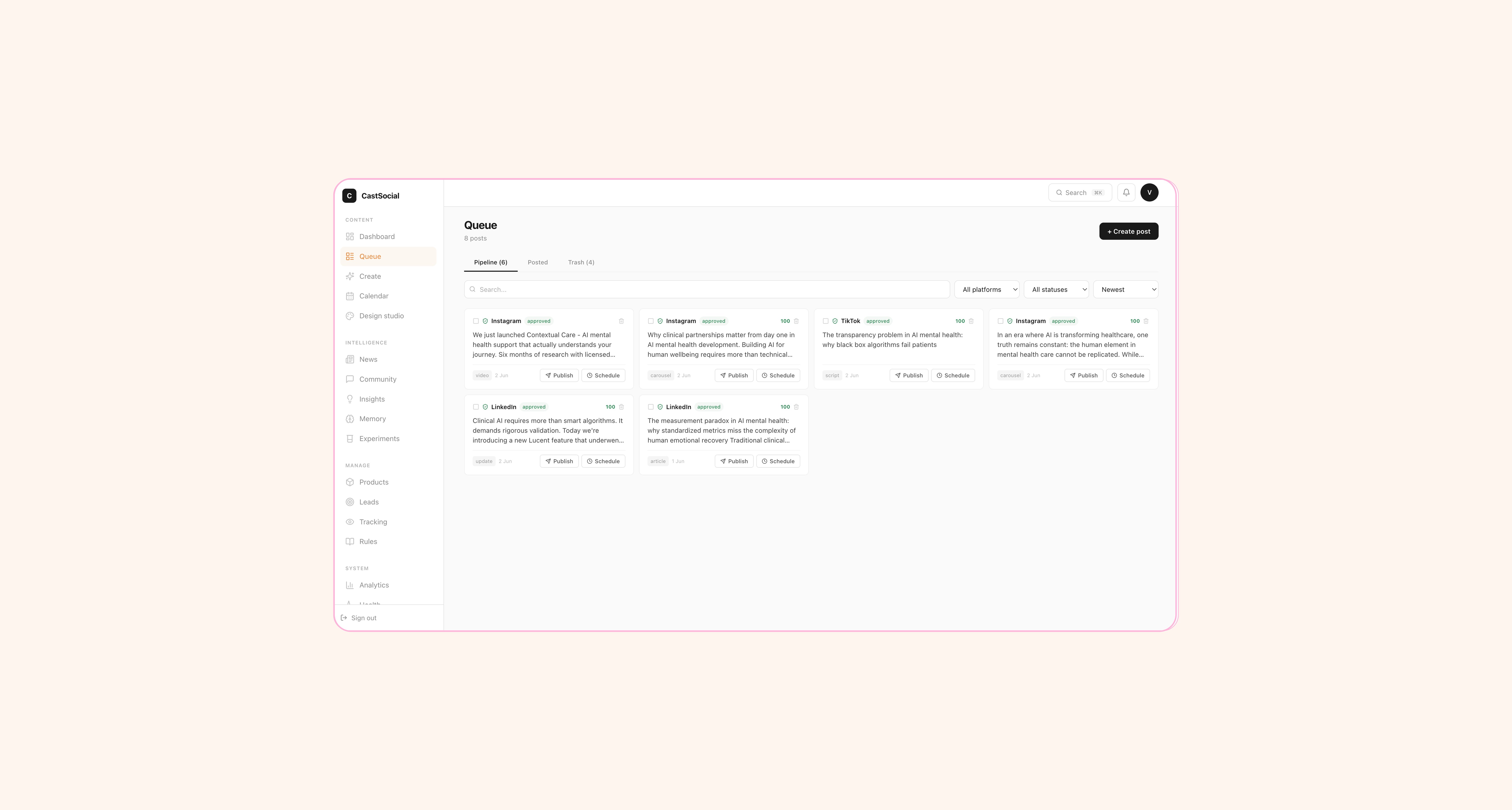
Content queue with quality scores and platform labels

The content queue. Each post shows its quality score, target platform, and approval status. Review in seconds.

176+
API endpoints across 10 routers
3
AI agents in the content pipeline
7
Days. PRD to production.

The Build

How seven days actually broke down

D1
Day 1: The PRD
Full product requirements document. Feature inventory, user flows, three-tier pricing model, AI pipeline architecture, success metrics, known limitations with planned solutions. Every feature marked as Live, Planned, or Deferred. The PRD became the build checklist for the rest of the week.
D2–3
Days 2–3: Backend and AI pipeline
FastAPI with 10 routers and 176+ endpoints. PostgreSQL with multi-tenant isolation (workspace_id on every table). The three-agent AI pipeline: Strategist, Copywriter, Quality Gate. Each agent has a specific job, specific inputs, specific outputs. Not one big prompt. Three specialised functions.
D4–5
Days 4–5: Frontend and onboarding
React app with the content queue, dashboard, settings (7 tabs), calendar, analytics, team page. The onboarding flow that captures brand context in three steps. The getting-started checklist. Plan enforcement across 12 frontend checks.
D6
Day 6: Landing page and edge cases
15-section landing page, mobile responsive. Empty states for every feature. Error handling. Plan limit modals. The landing page had to sell the product well enough for someone to sign up, so it got a full day, not an afternoon.
D7
Day 7: Deploy and test
Docker containers on Railway. Custom domain. Generated the first batch of content for Sane using the platform. Reviewed it, approved it, watched the quality scores. The product's first user was me.

System Design

Three agents, not one prompt

Most AI content tools work like this: you type a topic, it spits out a post. The output is generic because the system has no context. CastSocial works differently. Three separate agents run in sequence, each doing one thing well.

01
Strategist Agent
Reads the full brand context: company name, description, industry, voice, example posts, banned phrases, target audience, products, competitors. Picks content pillars, selects platforms, generates briefs. This is editorial planning, not random topic generation. The strategist decides what to talk about and where.
02
Copywriter Agent
Takes each brief and writes platform-specific content. A LinkedIn post is not a tweet with more words. The copywriter adapts format, tone, length, and structure per platform. Threads for Twitter. Long-form for LinkedIn. Visual-first captions for Instagram. Uses the brand voice and example posts to match how you actually sound.
03
Quality Gate Agent
Scores every post against 12 checks: brand voice alignment, factual accuracy, platform fit, engagement potential, compliance, banned phrases, and six more. Posts above the threshold go straight to the approved queue. Posts below go to review. The threshold is configurable. Nothing goes live without passing the gate. This is the feature that separates CastSocial from "I asked ChatGPT to write me a tweet."
BRAND CONTEXT (INPUT) Company Info Voice & Tone Example Posts Banned Phrases Target Audience Competitors Platforms AGENT 01 Strategist Reads brand context. Selects content pillars. Picks platforms. Generates briefs for each post. briefs[] AGENT 02 Copywriter Takes each brief. Writes platform-specific content. Adapts format, tone, length per platform. Matches brand voice. posts[] AGENT 03 Quality Gate 12-point scoring: brand voice, accuracy, platform fit, engagement, compliance, banned phrases. Threshold configurable. ABOVE THRESHOLD BELOW THRESHOLD Approved Queue Ready to publish Review Queue Needs human review Publish to Twitter / LinkedIn / Instagram Feedback loop

The three-agent AI pipeline. Brand context in, scored posts out. Nothing publishes without passing the gate.

A social media operation needs three functions: strategy, writing, and quality control. CastSocial runs all three as agents. Same workflow, no headcount.

Product Rigour

What the PRD actually looks like

The PRD goes deeper than a feature wishlist. It covers 18 live features with descriptions and status, 18 planned features with priorities, a three-tier pricing matrix, success metrics, a technical architecture section, and a known limitations section where every trade-off has a future solution attached. Here is what the feature inventory looks like:

Feature: Quality Gate Status: Live 12-point check on every generated post. Auto-approve threshold configurable (50-100). Posts below threshold go to manual review. Quality score shown on every post card. --- Feature: Rules Engine Status: Live AI Suggest button generates RSS feeds, blacklist, disclaimers, and regulatory rules based on your industry. Not a blank settings page. An intelligent starting point.

Every feature in the PRD has this structure: what it does, what its status is, how it works, and why it matters. The roadmap features have the same structure plus a priority level. Nothing is vague. Nothing says "improve content quality." It says "12-point check against brand voice, factual accuracy, platform fit, engagement potential, compliance, and banned phrases."

UX Decisions

Design choices that shaped the product

01
The dashboard shows your pipeline, not a wall of charts
First-time users see a getting-started checklist that disappears once setup is complete. After that, the dashboard shows five KPI cards (total posts, created today, approved, scheduled, posted), a visual pipeline flow from draft to published, a rejected-posts alert, and your recent content. The sidebar breaks down posts by platform and shows upcoming scheduled items. It answers "what do I need to do right now" every time you open it.
02
Onboarding captures brand context in three steps
Step 1: About (company name, industry, type). Step 2: Voice (tone words, example post, banned phrases). Step 3: Platforms (which channels to post on). This is not optional setup. The AI literally cannot generate good content without it. So the onboarding makes it impossible to skip. The time you invest in setup directly improves every post the system generates.
03
Quality score is visible on every post card
Each post in the queue shows its quality score as a percentage. 94% quality, 88% quality. You can see at a glance which posts the system is confident about and which ones need your attention. It is not hidden in a detail view. It is the first thing you see. Because the whole point is to spend your time only on the posts that need it.
04
Settings has 7 tabs and it needs all of them
Profile, Platforms, AI & Content, Publishing, Notifications, Billing, Account. The AI & Content tab is where you configure which models to use, the quality threshold, and the generation settings. It only shows models that have API keys configured. Users on the free plan see which models their plan allows. No confusion, no dead-end clicks.

Edge Cases

Where most AI products fall apart

01
Empty brand context
If you try to generate content without completing your brand profile, the system tells you what is missing and links you to the settings page. It does not generate generic content and hope you do not notice. Bad output from incomplete context would make the product look broken when the real problem is setup.
02
Plan limits hit gracefully
Free plan allows 30 posts per month and 3 platforms. When you hit the limit, you get a clear modal explaining what happened and what upgrading unlocks. Not a vague error. Not a silent failure. 28 backend checks and 12 frontend checks enforce limits at every layer. You cannot accidentally exceed your plan by calling the API directly.
03
AI model unavailable
The settings dropdown only shows models with configured API keys. If a provider goes down, the system handles it gracefully rather than throwing an error the user cannot understand. The model selector shows tier labels so you know what your plan allows before you try to use it.

Architecture

Multi-tenant from line one

Every table has a workspace_id. Every query filters by it. Each user gets a workspace when they register, seeded with default settings and connectors. This is not something I added later. It was in the PRD because the pricing tiers include an Agency plan with multiple client workspaces.

If I had built this as a single-user tool and tried to add multi-tenancy later, it would have been a rewrite. Building it from day one cost me an extra WHERE clause on every query. That is it. That is the difference between a quick hack and a real product.

API keys for AI providers (Anthropic, OpenAI) are platform-level, shared across all workspaces. OAuth tokens for social platforms (Twitter, LinkedIn) are per-workspace. This means no workspace can access another workspace's social accounts, but every workspace gets the same AI capabilities.

Retention Design

What brings people back

A content tool that you forget about is a dead product. Three things are designed to keep users coming back:

01
The review queue is always full. The AI generates content continuously. There is always something waiting for your approval. Opening CastSocial is never a blank screen.
02
Quality scores improve over time. The system learns from your approvals and rejections. Posts you approve teach it what good looks like. Posts you reject teach it what to avoid. The scores should trend upward the longer you use it.
03
Analytics close the loop. You can see which posts performed well. That data feeds back into the content strategy. It is not just "post and forget." It is "post, measure, improve."

Scope Discipline

The trade-offs I chose on purpose

The PRD has a "Known Limitations & Technical Debt" section. Every item has a reason and a planned solution. None of them are surprises.

Rate limiting is in-memory. Works fine under 1,000 users. Redis is the fix when scale demands it. JWT in localStorage. Functional for launch. httpOnly cookies come next. No email service. Resend is planned for verification, resets, and notifications. No error monitoring. Sentry planned for production tracking. 18 background agents lack workspace awareness. Not blocking for the API-served features that matter right now.

The difference between technical debt you chose and debt you accumulated by accident is whether you can explain every item on the list. I can.

Success Metrics

Five numbers that tell me if this is working

01
Time to first post: under 5 minutes. Registration to first AI-generated content in the queue. If setup takes longer, the onboarding is failing.
02
70%+ approval rate without edits. If most posts need editing, the AI is not saving anyone time. The quality gate exists to catch bad output before I ever see it.
03
Quality gate accuracy: 90%+. Posts that score above threshold should be approved 90% of the time. If the gate passes junk, it is worse than useless. It is wasting my review time.
04
10+ posts per user per week. The whole point is consistent output. If users are not publishing at volume, the product is not solving the problem.
05
15%+ free-to-pro conversion in 30 days. The free tier is useful. The pro tier is necessary if you are serious. If nobody converts, the line is in the wrong place.

What Comes Next

The roadmap is already written

18 features are planned, each with a priority. The high-priority ones: email verification via Resend, OAuth connections for direct publishing to Twitter/LinkedIn/Instagram, Stripe billing for plan upgrades. Medium: AI learning from user edits, content repurposing across platforms, batch generation for a week of content in one click. Low: A/B experiments, community monitoring, white-label agency reports.

The roadmap is not a wish list. It is a prioritised backlog with dependencies mapped. Direct publishing needs OAuth. OAuth needs the platform connection UI. The UI needs the settings tab refactor. The order matters.

My last startup failed because we hired too fast. This time I built what we needed instead. CastSocial exists because I could not afford a social media hire and refused to let that mean silence.

What I Learned

Building an AI product in a week

01
AI products need quality control, not just generation. Plugging into an API and generating text is the easy part. Making the output consistently good is the actual product challenge. The 12-point quality gate is the most important feature in the entire system. Without it, CastSocial is a ChatGPT wrapper. With it, it is a content operation.
02
Multi-tenancy costs almost nothing if you do it first. An extra column and a WHERE clause. That is the actual engineering cost of workspace isolation when you build it from scratch. Try adding it after you have 50 tables and 176 endpoints and it is a rewrite. The PRD specified agency support from day one, so the architecture supported it from day one.
03
The brand context is what makes it yours. Generic AI tools produce generic output because they have no context. The Brand Bible, which includes company name, voice, tone words, example posts, banned phrases, and audience, is what turns a text generator into something that actually sounds like your brand. The setup is not overhead. It is the product's core input.
04
Write down your trade-offs or they turn into mysteries. "Rate limiting is in-memory. Redis when we need it." That is a decision. "Why is rate limiting broken?" That is a bug. Same technical state. Completely different relationship with the codebase. Every known limitation in the PRD has a planned fix. That is the difference between technical debt and a mess.
05
Constraints force better thinking. I could not hire a social media manager. That constraint made me think about the entire content workflow as a system: strategy, creation, quality control, approval, publishing, analytics. If I had just hired someone, I would never have understood the workflow well enough to automate it.
Try CastSocial live
Next project
ThatStartup_
View project →
© 2026 Victor (O) Babatunde Designed & built by Victor (O).