Product Management Product Design Engineering SaaS

Dealbase: Share Documents. Know Who Reads Them.

We were getting ready to raise for Sane. That meant pitch decks, financials, and legal docs going out to investors. Google Drive gives you a link and nothing else. DocSend tracks views but cannot collect signatures. DocuSign collects signatures but tells you nothing about engagement. I needed all three in one place, so I built it.

Role
Solo. Strategy, PRD, design, code, deployment
Stack
Next.js 16, TypeScript, Supabase, Vercel, Resend, pdf-lib
Status
Timeline
One week. PRD to production.
Context
Built for fundraising at Sane, a clinical AI startup
Scope
33 pages, 15 API routes, 15 DB tables, 46 user stories
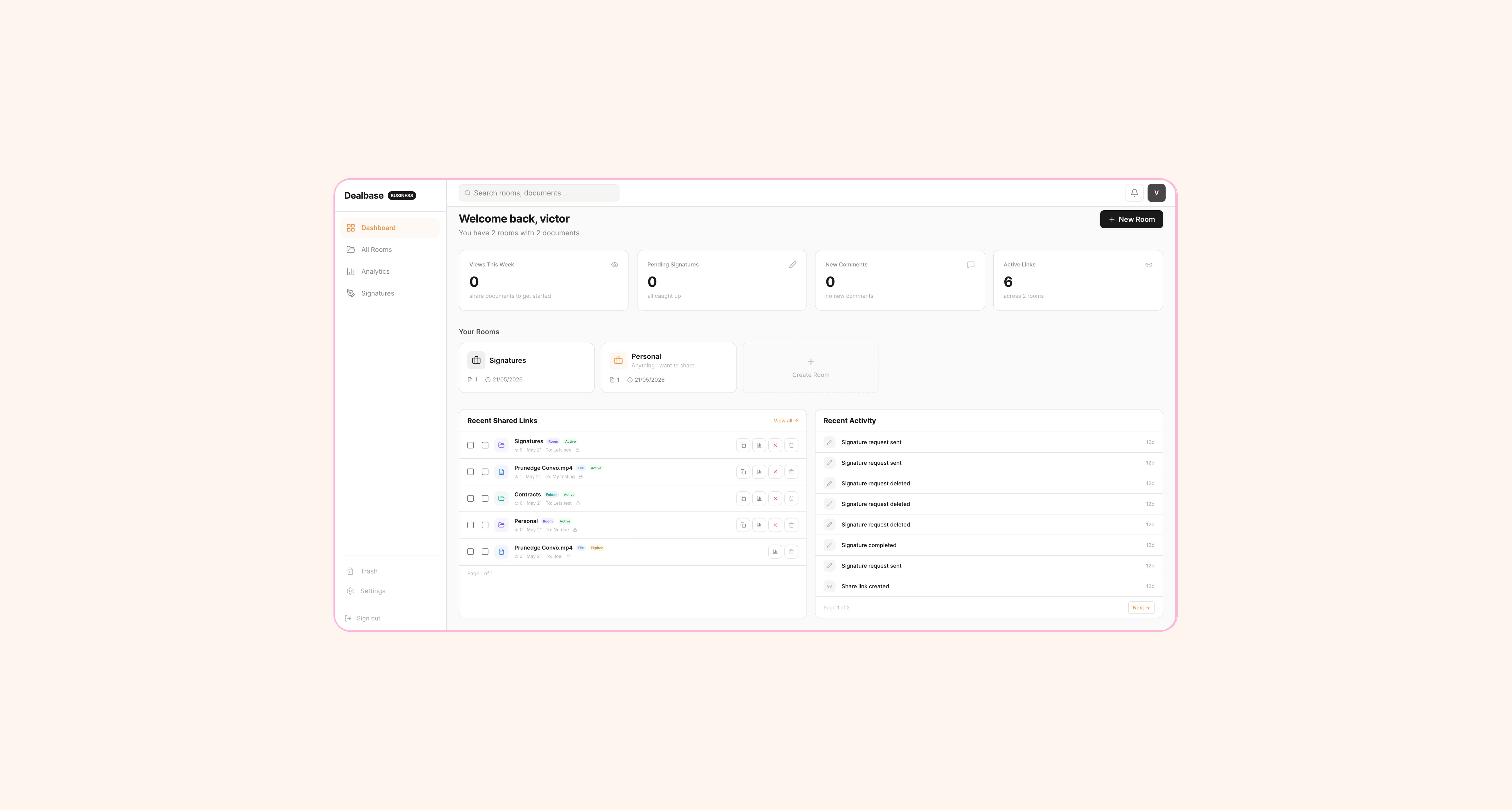
Dealbase dashboard with KPI cards and activity feed

The Dealbase dashboard. Four KPI cards, room overview, recent shared links, and a live activity feed.

Problem Definition

Who has this problem and how bad is it

If you are a founder raising money, you send your pitch deck to dozens of investors. Then you wait. You have no idea if they opened it. You do not know if they spent ten minutes on your financials or skipped straight to the team slide. You cannot tell if they forwarded it to a partner or deleted the email.

That matters more than it sounds. It changes how you run a fundraise. Without engagement data, you follow up blindly. You waste time chasing investors who never opened the deck and miss the ones who read every page twice. The fundraising process is already inefficient. Flying blind makes it worse.

01
No visibility. You share a Google Drive link. You get a read receipt if you are lucky. That is the extent of your intelligence.
02
Fragmented tools. DocSend for tracking, DocuSign for signatures, Google Drive for storage. Three logins, three billing cycles, zero shared context between them.
03
No access control. Once a PDF is downloaded, you lose all control. No revocation, no watermarks, no expiry. The document lives forever in someone's Downloads folder.
04
Expensive for early-stage. DocSend starts at $10/month. DocuSign starts at $15/month. For a pre-revenue startup, paying $25+/month for two tools that still do not talk to each other is a hard sell.

Competitive Landscape

Why existing tools were not good enough

DocSend does document tracking well. You get view counts, time spent, page-by-page analytics. But it cannot collect signatures. When you need an NDA signed before sharing a term sheet, you are back to DocuSign.

DocuSign handles signatures. But it has no concept of document engagement. You know someone signed, not whether they actually read what they signed. And the pricing is built for enterprises, not founders.

Google Drive is free, familiar, and useless for anything beyond storage. No analytics, no access control beyond "anyone with the link," no signatures, no audit trail.

The gap was obvious: nobody combined secure sharing, per-page analytics, and e-signatures in one product at a price that made sense for a startup. So that became the product.

33
Pages shipped, from landing to audit log
46
User stories in the PRD, each with acceptance criteria
7
Days. That is it. PRD to production.

The Build

How seven days actually broke down

People hear "built in a week" and assume it was hacked together. It was not. It was fast because the planning was thorough.

D1
Day 1: The PRD
No code. Entire day spent writing product requirements. 46 user stories across 10 feature areas. Each one has an ID, acceptance criteria, a concrete scenario, and a priority level (P0, P1, P2). The database schema, the API routes, and the page inventory all came from this document. Everything that followed traced back to something written on day one.
D2–3
Days 2–3: Database and API
15 Supabase tables with Row Level Security on every single one. 15 API routes. Auth flow with email, Google OAuth, and 2FA. The data model came directly from the PRD. Each table maps to a feature area, each endpoint maps to a user action.
D4–5
Days 4–5: Frontend and UX
33 pages in Next.js. The document viewer, the analytics dashboard, the signature placement interface, the share modals. Every page exists because a user story in the PRD requires it. No page was built on a whim.
D6
Day 6: Email and edge cases
7 HTML email templates: signature requests, signed documents, share notifications, view alerts, comments, weekly digests, team invites. Plus empty states, error handling, and confirm modals for destructive actions.
D7
Day 7: Deploy and test
Deployed on Vercel. Ran through every scenario in the PRD. Shared the first real pitch deck through the platform. Watched the analytics come in live.

Product Rigour

What a user story actually looked like

The PRD does not say "users should be able to share documents." Every story has a concrete scenario, the kind you can test against, word for word. Here is one of the 46:

SH-1: Secure Document Sharing Story: As a user, I want to share a document via a secure link. Acceptance Criteria: - Share modal generates unique short code URL - Can set recipient name/email - Optional password, expiry date, download toggle - NDA gate and watermark options for Pro+ Scenario: User opens share modal. Sets recipient "John". Enables password "abc123". Gets link. John opens link, enters password, views document. Owner sees "John viewed 2 min ago" in analytics. Priority: P0

That level of detail is not extra work. It is the reason the build went fast. When I got to day 4 and needed to build the share modal, I did not have to think about what it should do. The PRD already told me. I just built what it said.

The PRD was not documentation. It was the build plan. When the code got ambiguous, the PRD had the answer. That is why the week worked.

Feature Depth

What got built and why each piece matters

01
Rooms and folders
Documents organised into rooms with nested folders. A "Series A" room might have folders for financials, legal, and product. Each room, folder, or individual document can be shared independently with different access controls. This mirrors how fundraising actually works. You do not send everything to everyone.
02
Granular share links
Password protection, NDA gates, watermarks, download controls, expiry dates. Revoke any link instantly. The document renders in a custom viewer, not a download. You control the experience from start to finish. An investor sees your deck the way you designed it to be seen.
03
Per-page analytics
Not just "someone opened your document." Which pages they spent time on. Scroll depth. Completion rate. Engagement score. Real-time notifications when someone opens your link. You can tell the difference between an investor who skimmed and one who studied your financials.
04
Electronic signatures
Place signature fields on any PDF. Three methods: type, draw, or upload. Sequential or parallel signing order. Signed PDF generated with a certificate page and full audit trail. Public verification endpoint so a lawyer can independently confirm a signature is real.
05
Audit trail
Every action logged. Room created, document shared, link revoked, signature completed. Filterable. Exportable to CSV. For data rooms, this is a compliance requirement. If you are doing due diligence, you need to prove who accessed what and when.
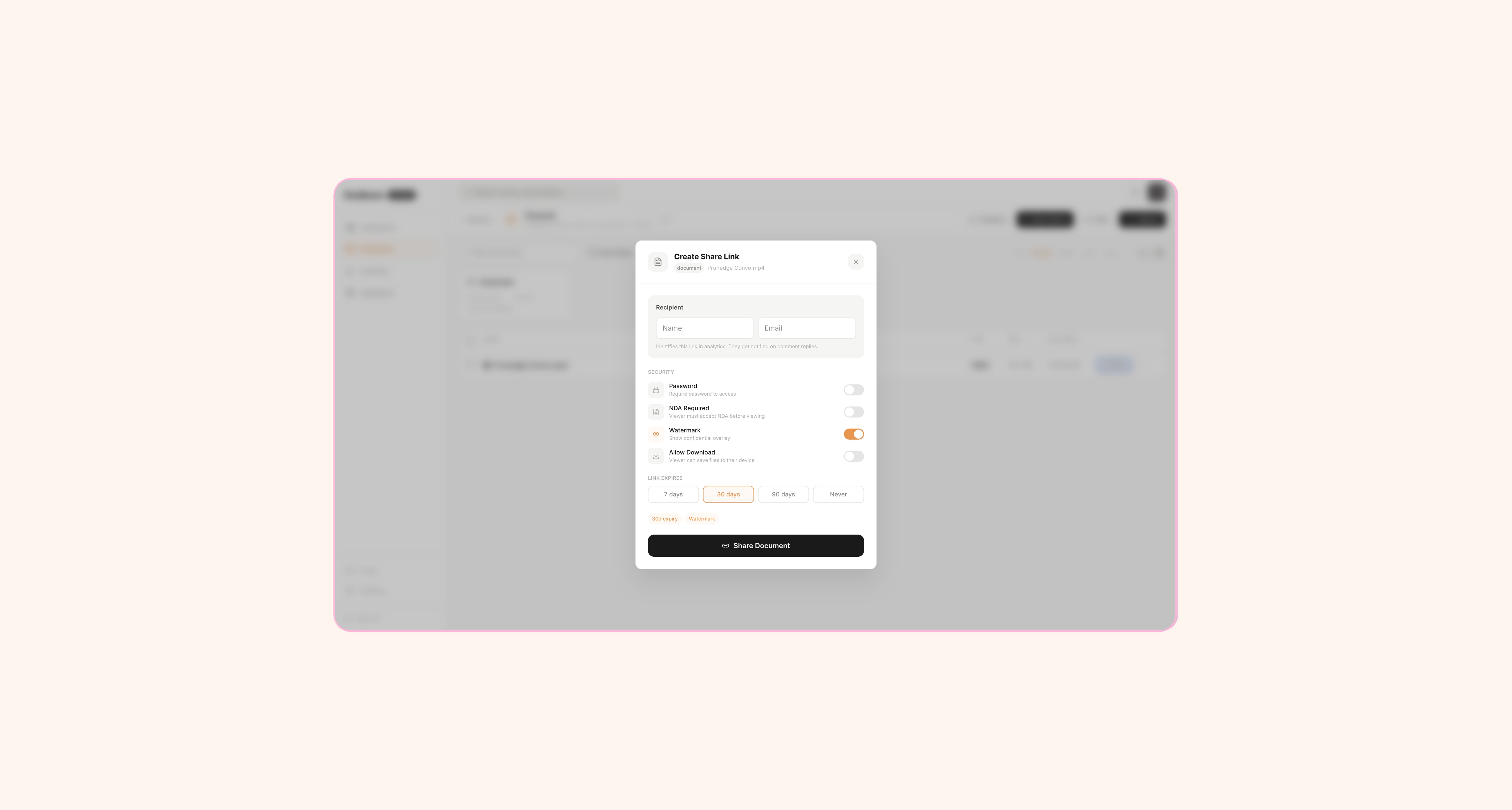
Create Share Link modal with security settings

The share modal. Recipient name, password protection, NDA gate, watermark toggle, download control, expiry date.

UX Decisions

The design choices that shaped the experience

A document sharing platform has two very different users: the person sharing (the founder) and the person viewing (the investor). The product has to work well for both, but they have completely different needs.

01
The viewer has no account
Investors should never need to create an account to view a pitch deck. The viewer page works with just a share link. If there is a password or NDA gate, the viewer completes it inline. No signup wall. This was a deliberate product decision. Friction on the viewer side kills engagement.
02
Confirm modals for destructive actions
Delete a room, revoke a link, void a signature. Every destructive action gets a styled confirmation modal. Not a browser alert. A real modal that explains what will happen. "Revoke this link? The recipient will no longer be able to access the document." It sounds small. It prevents real mistakes.
03
Dashboard shows what matters first
Four KPI cards at the top: views this week, pending signatures, new comments, active links. Not a wall of charts. The numbers a founder checks every morning when they are in the middle of a raise. Everything else is one click deeper.
04
Watermarks use the viewer's identity
When watermarks are enabled, each page shows the viewer's name and email as a semi-transparent diagonal overlay. It is not just branding. It is accountability. If a confidential document leaks, you know exactly which copy it was.

Edge Cases

The things that break if you do not think about them

Edge cases are where products fall apart. A polished happy path means nothing if the unhappy paths feel broken.

01
Expired links return a 410, not a 404
A link that expired is different from a link that never existed. The error page says "This link has expired" not "Page not found." The viewer knows they had access once. The difference matters.
02
Voided signatures cannot be re-opened
When a signature request is voided, the signing link stops working immediately. The signer sees "This request has been voided." Not a blank page, not an error. A clear explanation of what happened.
03
Soft-delete with recovery
Deleting a room or document moves it to Trash, not into the void. The Trash page shows everything that was deleted with timestamps. One click to restore. Because accidentally deleting a data room full of legal documents during a live deal is the kind of thing that should never be permanent.

Security Architecture

Multi-tenant isolation built in from day one

A document sharing platform that leaks data between users is worse than useless. Row Level Security is enabled on all 15 tables. Every query scopes to the user's organisation. A user in one org cannot see, query, or even accidentally stumble into another org's data.

The service role is used only where it has to be. The signing API needs it because signers do not have accounts. The tracking API needs it because viewers do not have accounts. Webhook deliveries need it to push events externally. Everywhere else, the user's own auth token determines what they can see. This was a deliberate decision, written into the PRD under "Security Requirements" before a single table existed.

Technical Architecture

How the pieces connect

The system splits into two tracks: authenticated users (the founder) and unauthenticated users (the viewer/signer). Both hit the same Supabase backend, but through different permission levels.

CLIENTS NEXT.JS 16 (VERCEL) SUPABASE SERVICES Founder (authenticated) Dashboard, rooms, settings Viewer (share link) No account required Signer (sign link) No account required Webhook consumer External systems /api/share Create links /api/track Analytics /api/sign E-signatures /api/signatures PDF generation /api/notify Email triggers /api/webhooks External push PostgreSQL 15 15 tables, all with RLS Auth Email, Google, 2FA Storage PDF, images, avatars Realtime Live view updates RLS Every table Resend 7 email templates pdf-lib Signing, certificates pdfjs-dist Viewer rendering Vercel Auto-deploy from GitHub

System architecture. Four client types, six core API routes, Supabase with RLS on every table.
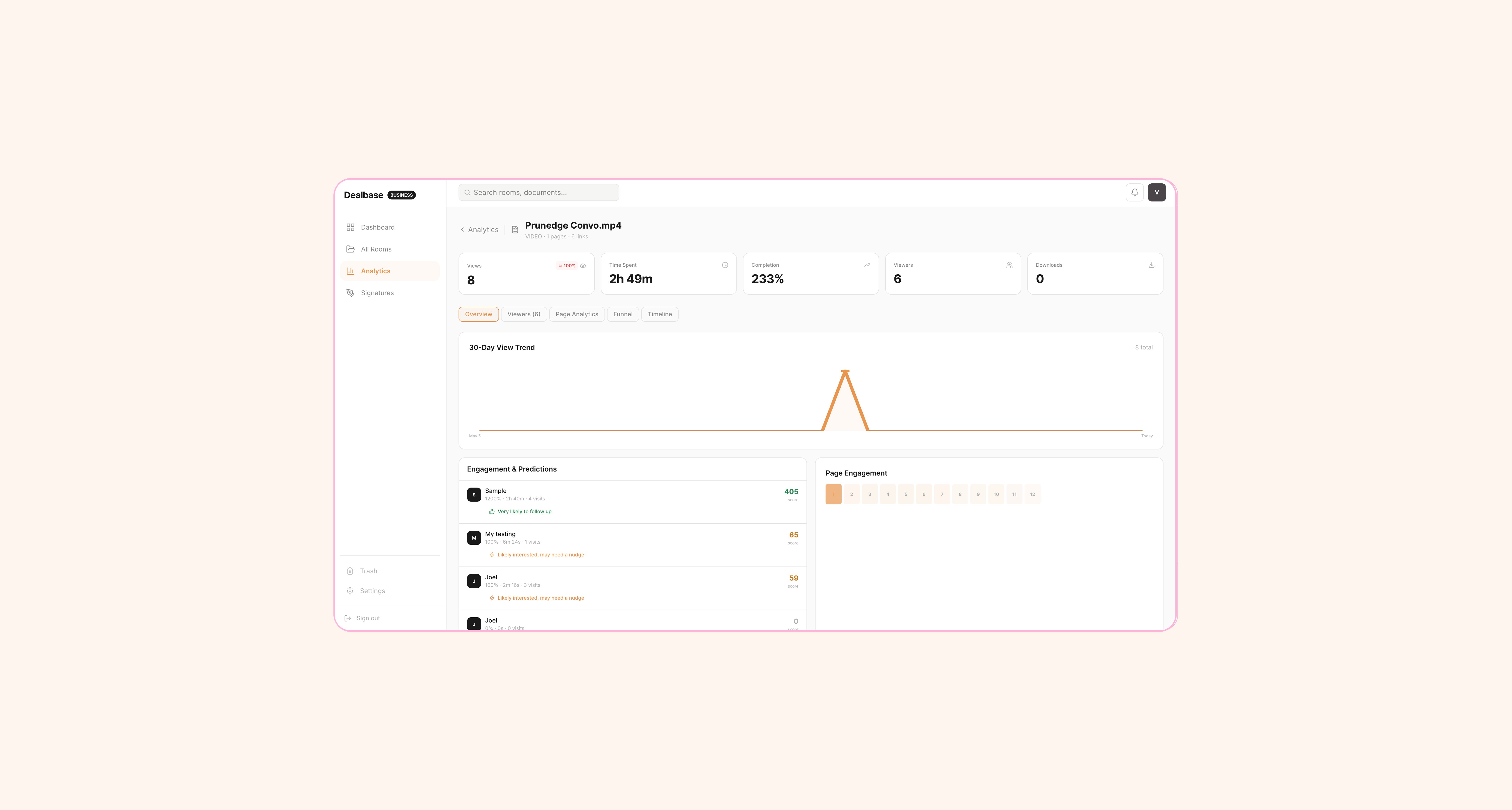
Document analytics with viewer engagement scores

Per-document analytics. View count, time spent, scroll depth, page-level heatmap, and engagement score.

Information Architecture

How 33 pages organise into a sidebar

The navigation groups around what you are doing, not what the feature is called. Dashboard is your morning check-in. All Rooms is where you manage content. Analytics is where you study engagement. Signatures is where you manage signing workflows. Settings is where you configure your workspace. Trash is where mistakes go to be undone.

The page count (33) sounds like a lot. But a user in the middle of a fundraise only touches five or six of them regularly: Dashboard, a specific Room, Share modal, Analytics for that document, and maybe Signatures. The rest, like Audit Log, Compare, Folder Analytics, and Settings, are there when they are needed and invisible when they are not.

Monetisation Design

Tiers based on how people actually use data rooms

Free gives you enough to test: one room, ten documents, thirty share links, basic view counts. That covers a solo founder sharing a single pitch deck.

Pro ($12/month) unlocks the intelligence: per-page analytics, NDA gates, watermarks, e-signatures, audit log, CSV export. This is the fundraising tier.

Business ($29/month) adds collaboration: up to 10 team members, webhooks, API keys, white-label branding on the viewer. This is the law firm / advisory tier.

The tiers map to user maturity. A founder raising a seed round does not need webhooks. A law firm managing client data rooms does not need a free plan. The lines are drawn where the use cases actually change, not where the feature count hits an arbitrary threshold.

Scope Discipline

What I deliberately did not build

The PRD has an "Open Items" section. These are features I evaluated, thought through, and chose to leave out. Not because they are bad ideas. Because they are wrong for week one.

01
Payment processing
Stripe/Paystack integration is deferred. The tier system and plan enforcement are built. The billing connection waits until there is paying demand. Building payment infrastructure for zero customers is a waste of a day I did not have.
02
SSO/SAML
Enterprise auth is in the plan as a Business-tier feature. The architecture supports it. But there are no enterprise customers yet. Building SSO for hypothetical users is how you spend a day solving a problem nobody has asked you to solve.
03
Geographic viewer data
The PRD includes it as P2. GeoIP lookup on document views, country and city stored in view events. Nice to know where your investors are. Not critical for launch. It will come.
04
Document comparison
Side-by-side engagement metrics for multiple documents. Useful when you want to A/B test two versions of a pitch deck. Real value, wrong week.

Success Metrics

How I know if this is working

The first test was simple. I shared Sane's actual pitch deck through Dealbase instead of Google Drive. Watched the analytics come in live. Saw which slides investors spent time on. Followed up with the ones who engaged. That was the validation.

Longer term, the metrics that matter are: documents shared per user per month (are people using it?), average viewer engagement time (is the tracking useful?), signature completion rate (does the signing flow work?), and free-to-Pro conversion (is the product worth paying for?).

What Comes Next

The roadmap is in the PRD

Four things are planned: Stripe/Paystack for payments when there is demand. Geographic viewer data for investor location intelligence. Document comparison for A/B testing decks. Custom domains per organisation for white-label use cases. Each one has a priority, a rationale, and a rough scope already written. They will get built when the product needs them, not before.

The product is the fundraising loop: share, track, sign. Everything in Dealbase exists to serve that cycle. If a feature does not connect to it, it does not ship.

What I Learned

Shipping a production SaaS in seven days

01
The PRD paid for itself in the first two hours of coding. Every time something felt ambiguous during the build, the answer was already written down. Acceptance criteria, scenarios, priority levels. The speed came from front-loading every decision into day one so days two through seven were pure execution.
02
Being your own user is an unfair advantage. I knew exactly what a founder needs when sharing a pitch deck because I was that founder. I had been asked to sign NDAs by other platforms. I had wanted page-level analytics for months. The entire feature set came from lived frustration, and that made every product decision faster.
03
Security goes in on day one or it never goes in properly. Row Level Security on every table, scoped queries on every endpoint, explicit service-role justification for every exception. You prove data isolation works before you write the first API route. Bolting it on after the fact always leaves gaps.
04
Saying no is the skill that makes speed possible. Geographic data, document comparison, payment processing, SSO. All real features with real value. All deliberately left out of week one. The priority system in the PRD made it possible to ship the most valuable 80% on time. Without that discipline, I would have shipped 60% of everything and finished nothing.
05
A product is a workflow, not a collection of screens. Dealbase has 33 pages. The product is the loop: upload, share, track, sign, audit. Every page exists because a user story requires it. Nothing got built at 2am on a whim.
Try Dealbase live
Next project
Dash
View project →
© 2026 Victor (O) Babatunde Designed & built by Victor (O).